DrawsmithقريبًاEnglish

قريبًا

مخططات تملكها
في كودك.

Drawsmith مكتبة مخططات لتطبيقات React، لا تفرض عليك واجهة. ارسم المخطط والنموذج ما زال يكتب، اعرضه، دع مستخدميك يعدّلونه، وشغّل عليه سير عمل. العُقد والمظهر والمحرّر كلها لك.

شاهد العرضشاهد ما تفعله

01رسم أثناء الكتابة

يرسم والنموذج ما زال يكتب.

أعطه ردًّا لم يكتمل بعد. لا يرسم سطرًا ناقصًا، وما رُسم يبقى في مكانه حتى يصل الباقي.

ردّ النموذجMermaid

هذا مسار الاسترداد كما وصفته:```mermaidflowchart TD  ask([طلب استرداد]) --> found{هل الطلب موجود؟}  found -->|لا| number[اطلب رقم الطلب]  found -->|نعم| window{خلال ٣٠ يومًا؟}  window -->|نعم| unused{المنتج غير مستخدم؟}  window -->|لا| credit[اعرض رصيدًا في المتجر]  unused -->|نعم| card[أعد المبلغ إلى البطاقة]  unused -->|لا| review[حوّل إلى موظف]  card --> receipt([أرسل الإيصال])  credit --> receipt  review --> receipt  receipt --> done([أغلق الطلب])```

<Diagram source={reply} streaming={!done} />

FlowchartFlowchart, top to bottom, with 10 steps and 11 connections. طلب استرداد leads to هل الطلب موجود؟. هل الطلب موجود؟ leads to اطلب رقم الطلب (labelled “لا”) and خلال ٣٠ يومًا؟ (labelled “نعم”). خلال ٣٠ يومًا؟ leads to المنتج غير مستخدم؟ (labelled “نعم”) and اعرض رصيدًا في المتجر (labelled “لا”). المنتج غير مستخدم؟ leads to أعد المبلغ إلى البطاقة (labelled “نعم”) and حوّل إلى موظف (labelled “لا”). اعرض رصيدًا في المتجر leads to أرسل الإيصال. أعد المبلغ إلى البطاقة leads to أرسل الإيصال. حوّل إلى موظف leads to أرسل الإيصال. أرسل الإيصال leads to أغلق الطلب.لانعمنعملانعملاطلب استردادهل الطلبموجود؟اطلب رقم الطلبخلال ٣٠ يومًا؟المنتج غيرمستخدم؟اعرض رصيدًا في المتجرأعد المبلغ إلى البطاقةحوّل إلى موظفأرسل الإيصالأغلق الطلب

يُرسم مع وصول النص

02وضع العرض

مكوّن واحد. حرّكه. كبّره. وانشره.

اسحب للتحريك وقرّب بإصبعين، والصفحة تواصل التمرير فوقه. ألوانه متغيّرات CSS فيأخذ مظهر صفحتك. وهذا حيّ أمامك.

schema.tsxReact

import '@drawsmith/core/theme.css';import { Diagram } from '@drawsmith/react'; export function Schema({ doc }: { doc: DiagramDoc }) {  return <Diagram doc={doc} onNodeClick={id => open(id)} />;}
Entity relationship diagramEntity relationship diagram with 11 entities and 12 relationships. organization: attributes PK id uuid; name text; country_code char(2); created_at timestamptz. organization 1 — 0..∞ workspace. organization 1 — 1 billing_account. workspace: attributes PK id uuid; FK organization_id uuid; UK slug text; region text. workspace 1 — 0..∞ usage_event. billing_account: attributes PK id uuid; FK organization_id uuid; UK processor_customer_id text; currency char(3); tax_id text. billing_account 1 — 0..∞ subscription. billing_account 1 — 0..∞ invoice. plan: attributes PK code text; name text; seat_limit int. plan 1 — 0..∞ subscription. plan 1 — 1..∞ plan_price. plan_price: attributes PK id uuid; FK plan_code text; interval text; unit_amount_cents int; currency char(3). plan_price 1 — 0..∞ subscription_item. subscription: attributes PK id uuid; FK billing_account_id uuid; FK plan_code text; status text; current_period_end timestamptz. subscription 1 — 0..∞ subscription_item. subscription_item: attributes PK id uuid; FK subscription_id uuid; FK plan_price_id uuid; quantity int. subscription_item 1 — 0..∞ usage_event. invoice: attributes PK id uuid; FK billing_account_id uuid; UK number text; total_cents int; status text; due_on date. invoice 1 — 1..∞ invoice_line. invoice 1 — 0..∞ payment. invoice_line: attributes PK id uuid; FK invoice_id uuid; description text; amount_cents int. payment: attributes PK id uuid; FK invoice_id uuid; method text; amount_cents int; paid_at timestamptz. usage_event: attributes PK id bigint; FK workspace_id uuid; FK subscription_item_id uuid; metric text; quantity bigint; occurred_at timestamptz.1 — 0..∞1 — 11 — 0..∞1 — 0..∞1 — 1..∞1 — 0..∞1 — 0..∞1 — 0..∞1 — 1..∞1 — 0..∞1 — 0..∞1 — 0..∞«table»organizationPKiduuidnametextcountry_codechar(2)created_attimestamptz«table»workspacePKiduuidFKorganization_iduuidUKslugtextregiontext«table»billing_accountPKiduuidFKorganization_iduuidUKprocessor_customer_id textcurrencychar(3)tax_idtext«table»planPKcodetextnametextseat_limitint«table»plan_pricePKiduuidFKplan_codetextintervaltextunit_amount_centsintcurrencychar(3)«table»subscriptionPKiduuidFKbilling_account_iduuidFKplan_codetextstatustextcurrent_period_endtimestamptz«table»subscription_itemPKiduuidFKsubscription_iduuidFKplan_price_iduuidquantityint«table»invoicePKiduuidFKbilling_account_iduuidUKnumbertexttotal_centsintstatustextdue_ondate«table»invoice_linePKiduuidFKinvoice_iduuiddescriptiontextamount_centsint«table»paymentPKiduuidFKinvoice_iduuidmethodtextamount_centsintpaid_attimestamptz«table»usage_eventPKidbigintFKworkspace_iduuidFKsubscription_item_iduuidmetrictextquantitybigintoccurred_attimestamptz

صورة ثابتة للمخطط إلى أن يُحمَّل العارض.

03وضع التحرير

ابنِ محرّرك أنت.

المحرّك يتكفّل بالتحديد والمقابض وخطوط المحاذاة والتراجع ولوحة المفاتيح والحافظة. والواجهة عليك. أمامك محرّران صغيران يعملان، ولكلٍّ تخطيطه. جرّبهما.

FlowchartFlowchart, left to right, with 6 steps and 6 connections. Cart leads to Pay now? Pay now? leads to Take the payment (labelled “Card”) and Send an invoice (labelled “Later”). Take the payment leads to Pack the order. Send an invoice leads to Pack the order. Pack the order leads to Ship it.CardLaterCartPay now?Take the paymentSend an invoicePack the orderShip it
حيّ. لوحة رسم يطفو فوقها شريط واحد. اسحب صندوقًا، ارسم خطًّا، ثم تراجع.

floating-editor.tsxReact

'use client'; import {  Canvas,  EditorRoot,  useHistory,  useTool,  useViewport,} from '@drawsmith/react/edit'; // One bar, floating over the canvas. Every button is a hook away.function Bar() {  const { tool, tools, setTool } = useTool();  const { undo, redo, canUndo, canRedo } = useHistory();  const { zoom, zoomIn, zoomOut } = useViewport();  return (    <div className='ed-float' role='toolbar' aria-label='Tools'>      {tools.slice(0, 4).map(t => (        <button          key={t.name}          type='button'          aria-pressed={tool === t.name}          onClick={() => setTool(t.name)}        >          {t.label}        </button>      ))}      <i />      <button type='button' onClick={undo} disabled={!canUndo}>        Undo      </button>      <button type='button' onClick={redo} disabled={!canRedo}>        Redo      </button>      <i />      <button type='button' onClick={zoomOut} aria-label='Zoom out'>        −      </button>      <span>{Math.round(zoom * 100)}%</span>      <button type='button' onClick={zoomIn} aria-label='Zoom in'>        +      </button>    </div>  );} export function FloatingEditor({ doc }: { doc: unknown }) {  return (    <EditorRoot defaultDoc={doc}>      <Canvas className='ed-canvas' title='A checkout flow' />      <Bar />    </EditorRoot>  );}

04سير العمل

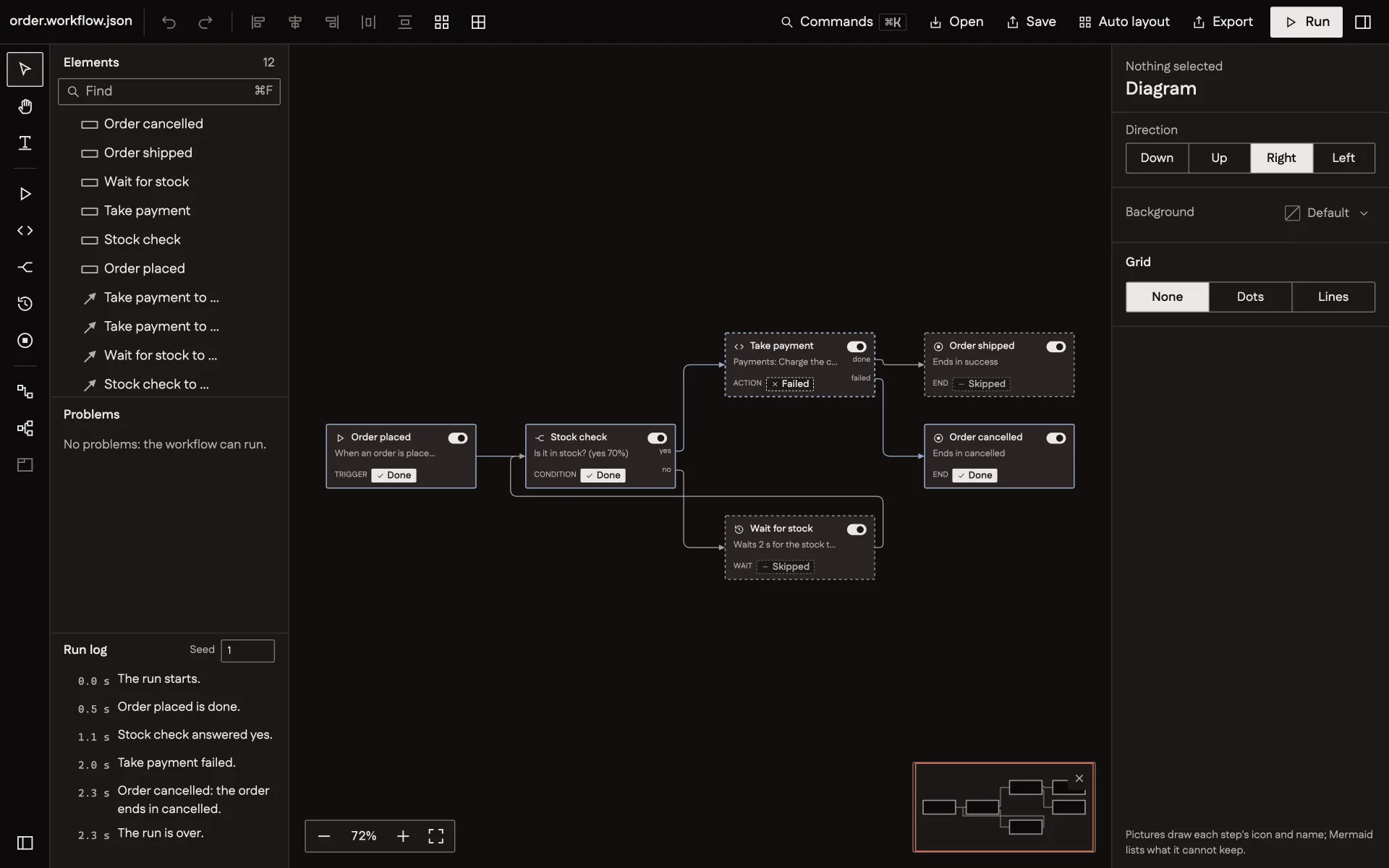
عُقدك مكوّنات React.

ارسم كل خطوة ببطاقة من تصميمك. حدّد أي الخطوط يصحّ وصلها. ثم دع التشغيل يضيء المخطط خطوة خطوة.
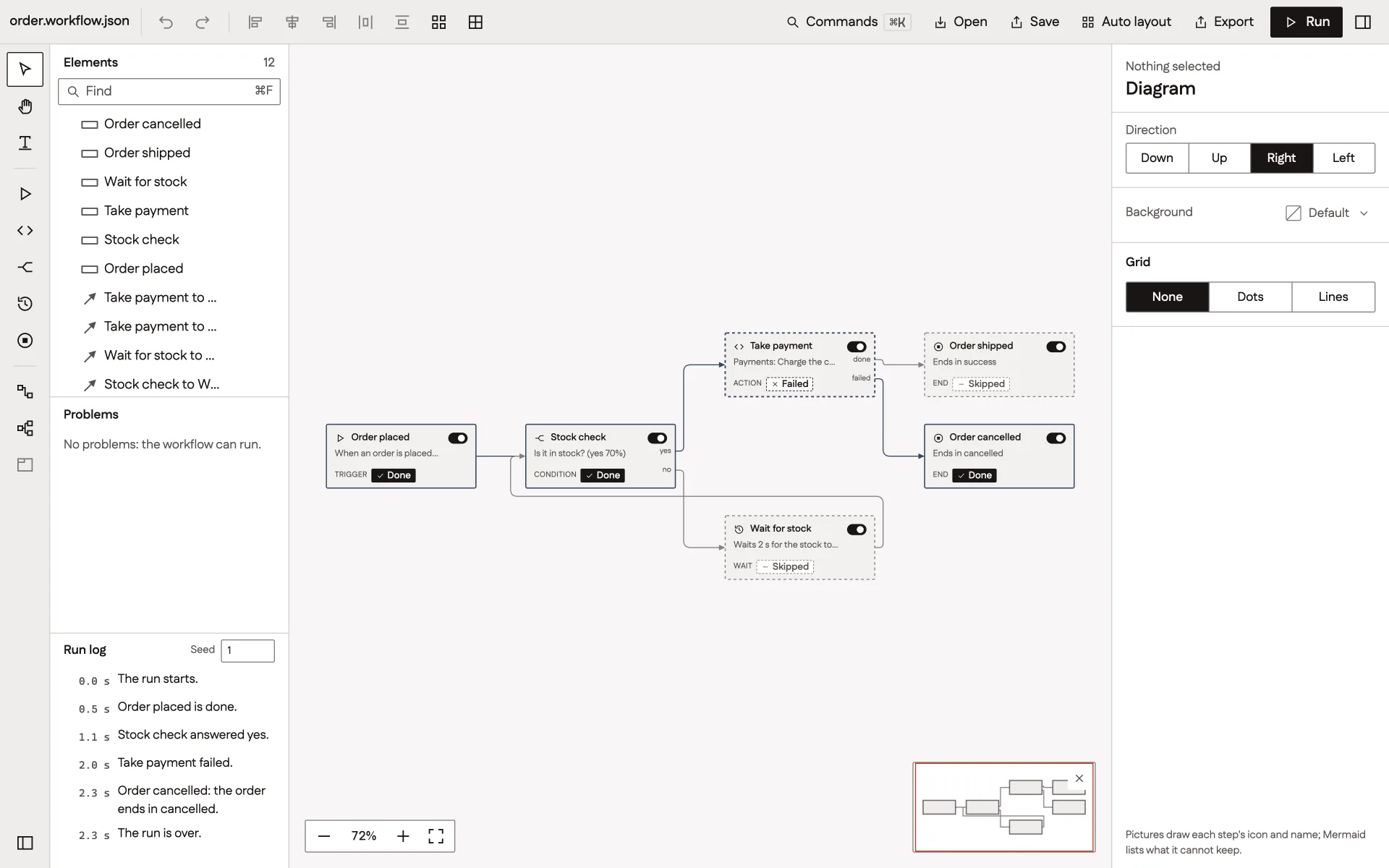
منشئ سير عمل مبني بـ Drawsmith. ست بطاقات خطوات موصولة بخطوط، وبجانبها سجل التشغيل.منشئ سير عمل مبني بـ Drawsmith. ست بطاقات خطوات موصولة بخطوط، وبجانبها سجل التشغيل.
منشئ سير عمل مبني على الأجزاء نفسها. انتهى هنا تشغيل للتو، وكل بطاقة تبيّن هل تمّت خطوتها أم فشلت أم تُخطّيت.

workflow.tsxReact

import { Canvas, EditorRoot } from '@drawsmith/react/edit'; export function Workflow({ workflow, steps, marks, card }: Parts) {  return (    <EditorRoot      defaultDoc={workflow}      shapes={steps}      marks={marks}      canConnect={({ to }) =>        to.port === 'in'          ? true          : { allowed: false, reason: 'A line ends at an input.' }      }    >      <Canvas renderNode={card} />    </EditorRoot>  );} // A run says what happens as marks:// marks.update({ charge: 'running', 'e-yes': 'passed' });

05الصيغ

Mermaid يدخل. PlantUML يدخل. draw.io يدخل.

أحضر مخططاتك كما هي. كلٌّ منها يصير مستند JSON واحدًا، والمستند لك تحفظه وتغيّره وترسمه.

checkout.mmdMermaid

1flowchart LR2  cart([Cart]) --> pay{Pay now?}3  pay -- Card --> take[Take the payment]4  pay -- Later --> inv[Send an invoice]5  take --> pack[Pack the order]6  inv --> pack7  pack --> ship([Ship it])

<Diagram source={text} />

FlowchartFlowchart, left to right, with 6 steps and 6 connections. Cart leads to Pay now? Pay now? leads to Take the payment (labelled “Card”) and Send an invoice (labelled “Later”). Take the payment leads to Pack the order. Send an invoice leads to Pack the order. Pack the order leads to Ship it.CardLaterCartPay now?Take the paymentSend an invoicePack the orderShip it

06المظاهر

كل لون متغيّر.

المقاسات والأوزان والزوايا في كائن مظهر واحد. غيّره فيتبعه الرسم نفسه، في الوضع الفاتح والداكن.

clay.tsTypeScript

import { createTheme } from '@drawsmith/core/svg'; export const clay = createTheme({  node: { color: 'amber', fontWeight: 600, radii: { rect: 3, round: 8 } },  edge: { strokeWidth: 2 },  light: {    background: '#fbf5ef',    ink: '#3a2417',    edge: '#8a5a3c',    palette: { amber: '#b5522b' },  },}); // <Diagram doc={doc} theme={clay} />
FlowchartFlowchart, top to bottom, with 6 steps and 6 connections. Cart leads to Pay now? Pay now? leads to Take the payment (labelled “Card”) and Send an invoice (labelled “Later”). Take the payment leads to Pack the order. Send an invoice leads to Pack the order. Pack the order leads to Ship it.CardLaterCartPay now?Take the paymentSend an invoicePack the orderShip it
Galleyالوضع الفاتح لنظام التصميم.
FlowchartFlowchart, top to bottom, with 6 steps and 6 connections. Cart leads to Pay now? Pay now? leads to Take the payment (labelled “Card”) and Send an invoice (labelled “Later”). Take the payment leads to Pack the order. Send an invoice leads to Pack the order. Pack the order leads to Ship it.CardLaterCartPay now?Take the paymentSend an invoicePack the orderShip it
Lampblackوضعه الداكن.
FlowchartFlowchart, top to bottom, with 6 steps and 6 connections. Cart leads to Pay now? Pay now? leads to Take the payment (labelled “Card”) and Send an invoice (labelled “Later”). Take the payment leads to Pack the order. Send an invoice leads to Pack the order. Pack the order leads to Ship it.CardLaterCartPay now?Take the paymentSend an invoicePack the orderShip it
Blueprintخطوط فاتحة على أزرق عميق.
FlowchartFlowchart, top to bottom, with 6 steps and 6 connections. Cart leads to Pay now? Pay now? leads to Take the payment (labelled “Card”) and Send an invoice (labelled “Later”). Take the payment leads to Pack the order. Send an invoice leads to Pack the order. Pack the order leads to Ship it.CardLaterCartPay now?Take the paymentSend an invoicePack the orderShip it
Clayأرضية دافئة وخطوط أثقل.

07في أي مكان

بلا متصفح.

دالة واحدة تحوّل النص إلى نص SVG في Node و Bun وفي خطوات البناء. وسطر الأوامر يفعل ذلك لمجلد كامل. والعربية تُقاس بخطّها وتُرسم من اليمين.

picture.tsNode, Bun, workers

import { writeFile } from 'node:fs/promises';import { renderDiagram } from '@drawsmith/core/render'; // No React. No DOM. One string of SVG.export async function picture(input: string) {  const result = await renderDiagram(input, { colors: 'page' });  if (result.status === 'ok') await writeFile('flow.svg', result.svg);}

TerminalCI

npx drawsmith render 'docs/**/*.mmd' --out docs/img --colors light,dark
FlowchartFlowchart, right to left, with 7 steps and 6 connections. طلب استرداد leads to هل الطلب موجود؟. هل الطلب موجود؟ leads to اطلب رقم الطلب (labelled “لا”) and خلال ٣٠ يومًا؟ (labelled “نعم”). خلال ٣٠ يومًا؟ leads to أعد المبلغ إلى البطاقة (labelled “نعم”) and حوّل إلى موظف (labelled “لا”). أعد المبلغ إلى البطاقة leads to أرسل الإيصال.لانعمنعملاطلب استردادهل الطلبموجود؟اطلب رقم الطلبخلال ٣٠ يومًا؟أعد المبلغ إلى البطاقةحوّل إلى موظفأرسل الإيصال

رسمه سطر الأوامر عند بناء هذه الصفحة.

شاهده يتحرك.

أقل من دقيقة من المحرّك والعارض والمحرّر وسير عمل.

بلا صوت حتى تشغّله أنت

Drawsmith

قريبًا.

يرسم
المخططات الانسيابية والتسلسلية ومخططات الأصناف والكيانات والحالات والخرائط الذهنية والهياكل التنظيمية وغيرها
يقرأ
مستند JSON الخاص به و Mermaid و PlantUML و draw.io
يُخرج
SVG في الصفحة أو نصًّا، و PNG، ومستند JSON، و Mermaid
الكتابة
اللاتينية والعربية، من اليسار إلى اليمين ومن اليمين إلى اليسار
الرخصة
مفتوح المصدر، MIT