Coming soon
Diagrams,
yours in code.
Drawsmith is a headless diagram library for React. Stream a drawing from a model, show it, let people edit it, run a workflow on it. The nodes, the theme and the editor are yours.
01Streaming
It draws while the model is still typing.
Hand it a reply that is still arriving. Nothing half written is drawn, and what is already on the page holds its place while the rest comes in.
The model’s replyMermaid
Here is the refund flow as you described it:```mermaidflowchart TD ask([Refund requested]) --> found{Order found?} found -->|no| number[Ask for the order number] found -->|yes| window{Within 30 days?} window -->|yes| unused{Item unused?} window -->|no| credit[Offer store credit] unused -->|yes| card[Refund to card] unused -->|no| review[Send to an agent] card --> receipt([Send the receipt]) credit --> receipt review --> receipt receipt --> done([Close the request])```<Diagram source={reply} streaming={!done} />
Drawn as the text arrives
02View mode
One component. Pan it. Zoom it. Ship it.
Drag to pan, pinch to zoom, and the page keeps scrolling over it. Its colours are CSS variables, so it wears your page. This one is live.
schema.tsxReact
import '@drawsmith/core/theme.css';import { Diagram } from '@drawsmith/react'; export function Schema({ doc }: { doc: DiagramDoc }) { return <Diagram doc={doc} onNodeClick={id => open(id)} />;}A still of the drawing, until the viewer loads.
03Editor mode
Build your own editor.
The engine brings selection, handles, guides, undo, the keyboard and the clipboard. You bring the interface. Two small editors are running below, each laid out its own way. Try them.
floating-editor.tsxReact
'use client'; import { Canvas, EditorRoot, useHistory, useTool, useViewport,} from '@drawsmith/react/edit'; // One bar, floating over the canvas. Every button is a hook away.function Bar() { const { tool, tools, setTool } = useTool(); const { undo, redo, canUndo, canRedo } = useHistory(); const { zoom, zoomIn, zoomOut } = useViewport(); return ( <div className='ed-float' role='toolbar' aria-label='Tools'> {tools.slice(0, 4).map(t => ( <button key={t.name} type='button' aria-pressed={tool === t.name} onClick={() => setTool(t.name)} > {t.label} </button> ))} <i /> <button type='button' onClick={undo} disabled={!canUndo}> Undo </button> <button type='button' onClick={redo} disabled={!canRedo}> Redo </button> <i /> <button type='button' onClick={zoomOut} aria-label='Zoom out'> − </button> <span>{Math.round(zoom * 100)}%</span> <button type='button' onClick={zoomIn} aria-label='Zoom in'> + </button> </div> );} export function FloatingEditor({ doc }: { doc: unknown }) { return ( <EditorRoot defaultDoc={doc}> <Canvas className='ed-canvas' title='A checkout flow' /> <Bar /> </EditorRoot> );}04Workflows
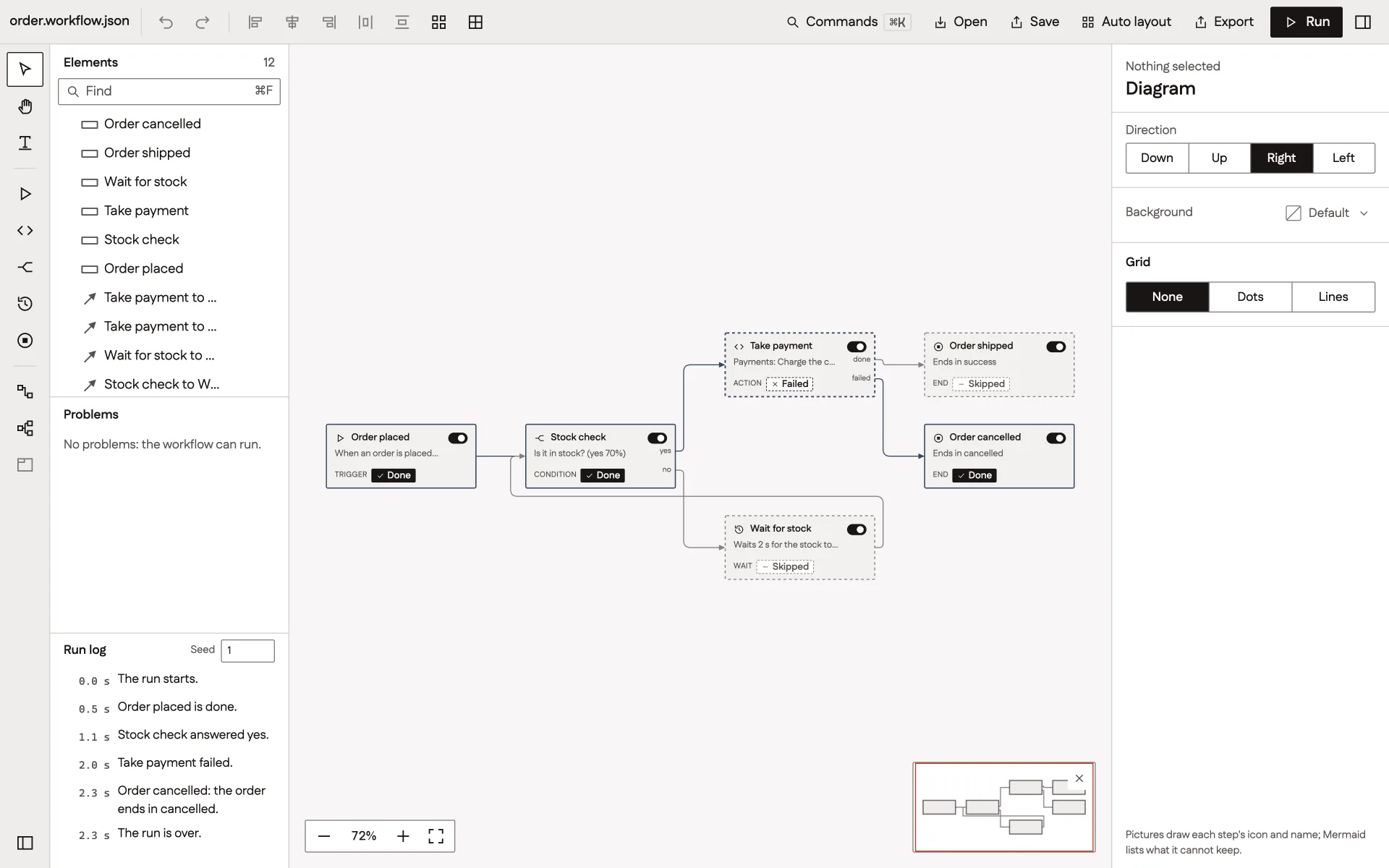
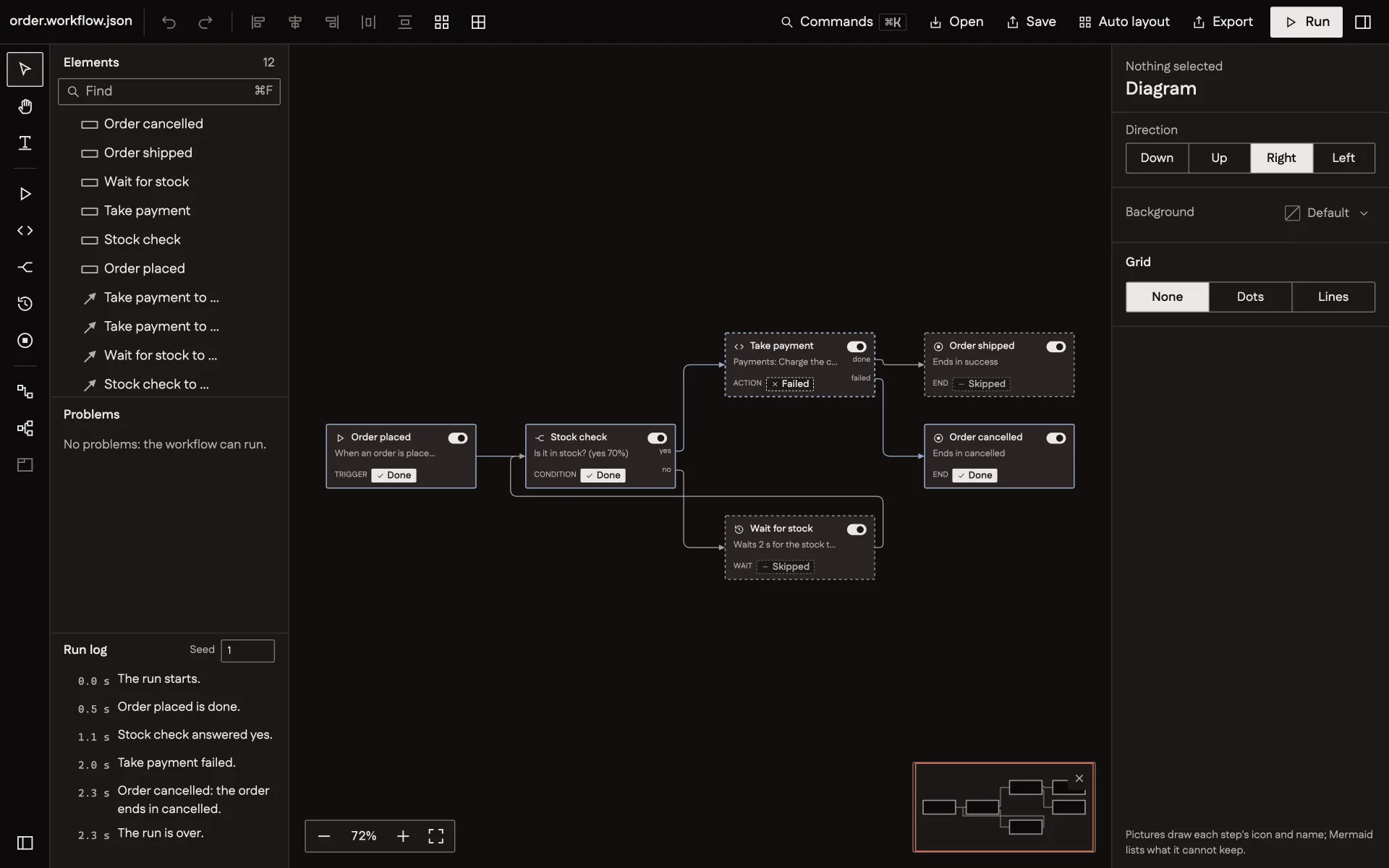
Your nodes are React components.
Draw each step as a card of your own. Say which lines may connect. Then let a run light up the drawing, step by step.
workflow.tsxReact
import { Canvas, EditorRoot } from '@drawsmith/react/edit'; export function Workflow({ workflow, steps, marks, card }: Parts) { return ( <EditorRoot defaultDoc={workflow} shapes={steps} marks={marks} canConnect={({ to }) => to.port === 'in' ? true : { allowed: false, reason: 'A line ends at an input.' } } > <Canvas renderNode={card} /> </EditorRoot> );} // A run says what happens as marks:// marks.update({ charge: 'running', 'e-yes': 'passed' });05Formats
Mermaid in. PlantUML in. draw.io in.
Bring the diagrams you already have. Each becomes one JSON document, and that document is yours to keep, change and draw.
checkout.mmdMermaid
1flowchart LR2 cart([Cart]) --> pay{Pay now?}3 pay -- Card --> take[Take the payment]4 pay -- Later --> inv[Send an invoice]5 take --> pack[Pack the order]6 inv --> pack7 pack --> ship([Ship it])<Diagram source={text} />
06Themes
Every colour is a variable.
Sizes, weights and corners sit in one theme object. Change it and the same drawing follows, in light and in dark.
clay.tsTypeScript
import { createTheme } from '@drawsmith/core/svg'; export const clay = createTheme({ node: { color: 'amber', fontWeight: 600, radii: { rect: 3, round: 8 } }, edge: { strokeWidth: 2 }, light: { background: '#fbf5ef', ink: '#3a2417', edge: '#8a5a3c', palette: { amber: '#b5522b' }, },}); // <Diagram doc={doc} theme={clay} />07Anywhere
No browser needed.
One function turns text into a string of SVG in Node, Bun, workers and build steps. The command line does the same for a folder of files. Arabic is measured in its own script and laid out from the right.
picture.tsNode, Bun, workers
import { writeFile } from 'node:fs/promises';import { renderDiagram } from '@drawsmith/core/render'; // No React. No DOM. One string of SVG.export async function picture(input: string) { const result = await renderDiagram(input, { colors: 'page' }); if (result.status === 'ok') await writeFile('flow.svg', result.svg);}TerminalCI
npx drawsmith render 'docs/**/*.mmd' --out docs/img --colors light,darkDrawn by the command line when this page was built.
Watch it move.
Under a minute of the engine, the viewer, the editor and a workflow.
Muted until you turn the sound on
Drawsmith
Coming soon.
- Draws
- Flowcharts, sequence, class, entity and state diagrams, mind maps, org charts and more
- Reads
- Its own JSON document, Mermaid, PlantUML and draw.io
- Gives back
- SVG in the page or as a string, PNG, its JSON document and Mermaid
- Scripts
- Latin and Arabic, left to right and right to left
- Licence
- Open source, MIT